Photo by Lum3n from Pexels

Design and Code – Part 10 – The Bake Off – Statistical Comparison, Part I

This is the tenth in a series of blog posts I’ve been working on during COVID isolation. It started with the idea of refreshing my systems design and software engineering skills, and grew in the making of it.

Part 1 describes ‘the problem’. A mathematics game designed to help children understand factors and limits which represents the board game Ludo.

Part 2 takes you through the process I followed to break this problem down to understand the constraints and rules that players follow as a precursor to implementation design.

Part 3 shows how the building blocks for the design of the classes and methods are laid out in preparation for understanding each of the functions and attributes needed to encapsulate the game.

In Part 4 we get down to business… producing the game using the programming language PHP with an object orientated approach.

Part 5 stepped it up a notch and walked through a translation of the code to object orientated C++.

Part 6 delves into the world of translating the code into object-orientated Java.

In Part 7 the same code is then translated into Javascript.

In Part 8 I slide into the sinuous world of Python and learn a thing or two about tidy coding as I go.

Part 9 explored the multi-faceted world of Ruby.

In this post I seek to answer the question – did all of these languages implement the algorithm consistently, and how would we know if they did? This starts us down a path of data analysis and how to find patterns in large sets of data.

Get in touch on Twitter at @mr_al if you’d like to chat.


Credit: Demetri Martin’s “My Ability to draw Mountains over time”

Looking for “Something Interesting”

So, I’d interpreted the algorithm, implemented it in several languages, and was then thinking… now what?

Sure, there were more languages to explore, and variations on those already knocked on the head, such as.GUI or mobile platform versions. But, I wanted to see how it would scale, and whether the same algorithm executed in different languages produced consistent results.

I did Stats 1-0-1 at university as part of my post-grad studies… they called it ‘Data and Decisions’ as it was a business school. I learned enough to be dangerous and to dive down the rabbit hole that consisted of looking at large data sets from different angles seeking, as my lecturer put it, “Something Interesting”.

To him, “interesting” meant “odd, unexplained, or insightful”. I interpreted that slightly different, outside of “ohh look, pretty graph!” and plotting R-regressions. (and, thanks to my science and engineering alumni, always remembering to label my axes.). Initially I did a run of just over 300 games using the PHP version and recorded the total number of moves before there was a clear winner. For example:
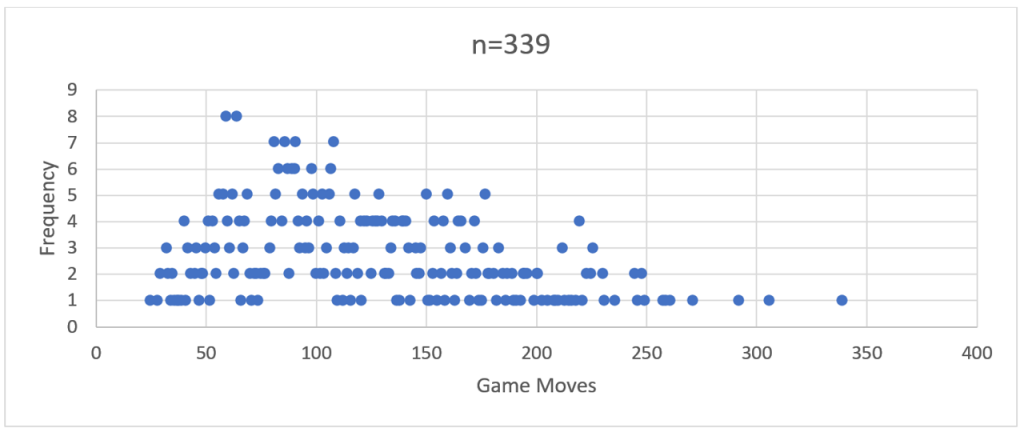
Figure 2 – PHP-run distribution curve showing frequency of total game moves over a run of 339 games

If you squint closely you can see the ghostly outline of a bell-shaped frequency curve.

So, then I ran a comparison with 2,200 games through the Java version.

Figure 3 – Java-run distribution curve showing frequency of total game moves over a run of 2,200 games

There you go – a more distinct bell curve with a long right hand tail – a distinct positive skew.

The more of these large ‘runs’ of games I performed across the different language implementations, the more a ‘visual’ pattern emerged. This was characterised by a frequency peak in the early 100’s followed by a long tail reaching out to the mid-600s or higher.

My stats 1-0-1 training gave me some basic tools to look beyond the simple shape of the curve, particularly when it came to comparing how these models differed from language to language.

However, my working hypothesis was this – a standard algorithm based on logical decision making should produce near identical results regardless of the language it was coded in.

Makes sense, right? If every ‘language’ is interpreting and following the same set of rules, and making the same decisions based on these, then the results should be the same. But they were not.

In saying that, and to butcher some Orwell, some were more equal than others. The best way to demonstrate this was to execute a batch run of 49,999 games for each language and compare the results. Why 49,999? Turns out it is the largest prime number short of 50,000. And I love me a good prime.

Performing Large Runs

These 6 batch runs occurred simultaneously, albeit through a few different execution methods.

The PHP and Javascript code was served up and run from a cPanel based web hosting platform, with the PHP code running server-side and displaying results to the browser client, and the Javascript running and displaying on the browser (Chrome).

The C++ and Python code fully compiled into a distributed executable. The batches were triggered through a Windows Powershell app running in a command shell window. The Ruby and Java code was also batched through Powershell, but calling the installed run-time environment. i.e.

For Java, this was running:    
       java -classpath Auto120 Auto120.auto120

And for Ruby it was:
                      powershell -ExecutionPolicy Bypass -File auto120.ps1

…where auto120.ps1 contained the simple command: 
 ruby main.rb

(Side note – the execution policy bypass in the Ruby script was to get around security issues baked into Windows 10 to prevent the running of malicious code.)

Analysing the Data using Excel

Now that we had six sets of 49,999 data points, there needed to be consistency in how this was modelled. Excel has simple built in tools to support this, and I used them as follows:

A. Normalise the data as a sequence of games with the number of total moves per game.

A spreadsheet with labelled columns holds the game sequence number (not used but useful to uniquely identify the data) and the ‘moves’ which is stripped from the ‘FINAL MOVE:’ output at the end of each game.

Figure 4 – Subset of the data for a large run. Column A contains the game-run sequence, column B holds the total number of game moves for that game.

B. Calculate the frequency of games that have the same number of moves.

Selecting the table created in step ‘a’, create a Pivot Table calculating the ‘Count of Moves’ alongside the ‘Moves’ as a row will return a grouped table. In the first column will be the number of game moves, in the second column will be the frequency (count) of games which were completed with that number of moves.

Figure 5 – Using a Pivot Table to aggregate data into frequency groupings, giving the total number of games from the data set which have an identified number of game moves.

C. Graph this frequency against consistently scaled axes, clipping off outliers where necessary.

The output from step ‘b’ gives us an ‘x’ axis (Row Labels) and a ‘y’ axis (Count of Moves) to plot. Excel doesn’t like plotting a Scatter Graph directly from a Pivot Table, so a bit of cut-and-paste-values is needed to recreate this table.

You could do a straight-up histogram (vertical columns rather than data points); however, the visual impact of the shape of the graphs and the clustering of data points is not as obvious.  

Figure 6 – Creating a frequency distribution graph from the grouped data

D. Calculate the average, median, mode and standard deviation

Again, Excel and its pre-baked formulae comes to the rescue, with AVERAGE, MEDIAN, MODE and STDEV.
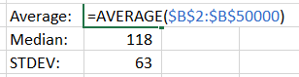
Figure 7 – Getting Excel to do the hard work of calculating statistics

The ‘input’ for these is the ‘Moves’ column created in step ‘a’. These three calculations provide a useful marker to answer the question: Are we looking at similar sets of data?

A quick note on averages

By itself, I dislike using ‘Average’ as a sole indicator of data consistency. As a colleague once pointed out, on ‘average’ any given human population is assigned 50% male and 50% female at birth. So, it is fairly useless as a large-scale differentiator.

‘Median’ adds flavour to this by identifying the central point of the data when sorted from lowest to highest. Including the most frequently occurring data point – ‘Mode’ – gives you an idea of the landscape of data. ‘Standard Deviation’ takes a bit to get your head around, but in short gives you a measure of how dispersed the data is from the average point.  

Combined these statistical indicators provide us with a mathematically sound set of measures by which we can compare like-for-like sets of data.

Additional considerations

E. Calculate the skewness (symmetry of the frequency curve) and kurtosis (clustering of data points in the peak or curves)

A numerical way of analysing the distribution curves – skewness tells us how much of the data is clustered to the left or right of the distribution. A perfect skewness – close to zero – means a near perfect symmetry in what is termed a ‘normal distribution’. A positive, or ‘right’ skew, means that most of the data points are at a value higher than the average, median and mode values. A negative, or ‘left’ skew, means the opposite.

Again, Excel comes to the rescue with the simple ‘KURT’ and ‘SKEW’ formula, into which the same superset of ‘Moves’ data points can be run.  

A simple way of understanding kurtosis is how tight the ‘tails’ of the distribution are. A tall, narrow distribution will have a low kurtosis value. A flat, wide distribution or one that has a particularly skewed tail will have a higher kurtosis value.

So – enough of Stats 1-0-1. I now had six large sets of data, a standard way of comparing these and a curiosity to understand what had happened from the initial design of the algorithm, through to the coding and now viewed through the output?

More to be revealed in my next post, where the data is compared and patterns revealed.

Photo by Lum3n from Pexels

Design and Code – Part 9 – Implementing ‘Auto120’ in Ruby

This is the ninth in a series of blog posts I’ve been working on during COVID isolation. It started with the idea of refreshing my systems design and software engineering skills, and grew in the making of it.

Part 1 describes ‘the problem’. A mathematics game designed to help children understand factors and limits which represents the board game Ludo.

Part 2 takes you through the process I followed to break this problem down to understand the constraints and rules that players follow as a precursor to implementation design.

Part 3 shows how the building blocks for the design of the classes and methods are laid out in preparation for understanding each of the functions and attributes needed to encapsulate the game.

In Part 4 we get down to business… producing the game using the programming language PHP with an object orientated approach.

Part 5 stepped it up a notch and walked through a translation of the code to object orientated C++.

Part 6 delves into the world of translating the code into object-orientated Java.

In Part 7 the same code is then translated into Javascript.

In Part 8 I slide into the sinuous world of Python and learn a thing or two about tidy coding as I go.

Now in the final of my first-round translations I explore the intriguing world of Ruby.

Get in touch on Twitter at @mr_al if you’d like to chat.


Ruby

Available on GitHub at: https://github.com/mr-alistair/ootest-py

I decided to have a look at Ruby as a gateway to understanding something a little different – the Liquid scripting language used in Shopify eCommerce sites. Liquid is written in Ruby, and so it made sense to understand the underlying framework and syntax.

Besides, our family dog is named Ruby, and she’s a legend of a #floof. What’s not to love?

Figure 1 – Ruby the family #floof, enjoying a coffee and a chat with me. [Photo credit: Alan Moyle at Photobat]

Ruby is a relatively contemporary language, Japanese in origin and descended in part from Python, Eiffel, BASIC and other favourites. As a result, the grammar and syntax are interesting.

The analogy that comes to mind is that of Sign Languages for the hearing/speaking impaired. There is not a single, common signing language – there are local variants that have matured over time. For example, American and British Sign Language share a large percentage of their structure with French Sign Language, but with enough local nuance and turn of phrase to be fundamentally different. The way in which you structure a sentence in Sign Language is different to what how it may be spoken, though. This is Ruby, in a nutshell.

As with Python, there was a bit of a learning curve. I’m going to summarise it here, as once I got into the rhythm of porting the code, it went along better than I expected. This was probably my fastest conversion – which after five previous attempts, you would kinda hope for.

  1. Import vs require – The Ruby equivalent of ‘import’ is ‘require’, or more specifically, ‘require_relative’ when loading a library/module that is in the same folder as your code.
  2. Don’t @ me – Whereas PHP uses a dollar sign [$] to indicate a variable, Ruby uses the @ symbol. However, when using variable objects that have been passed to a Class method, the @ is not required. For example:

A simple trick was this – when executing code, if an @ had been left off of a variable object name, the compiler assumed there was a method of that name to be found, and would fail. This was a cheats way of finding untidy code.

3. Get me the attributes – Ruby has a handy function named attr_accessor which exposes the attributes of Classes within other Classes, similar to a ‘getter’ method in other languages. I discovered this the hard way (is there any other?) when trying to figure out why I could not read or write to the p_pieces attributes of instances of the Player Class from the Game Class.

attr_accessor gets past having to create separate getter Classes, and could be limited to only apply to specific attributes, like so:

4. New things – The noun-verb grammar of Ruby took some adjustment. Whereas in other languages you would instantiate a new Class object by assigning a variable with new Objectname(), in Ruby it became:

…to create a new array of p_pieces and then assign a new instance of Marker to it. This in turn would trigger the initialize method to instantiate the Class object.

Extending that array – and adding four more Markers – used the now-familiar push function, like so:

5. Bracketing without parentheses – As you can see from the code snippet above, Ruby does not terminate lines with punctuation – no semi-colons to be seen, here. However, it does re-introduce one of our friends who was missing from Python – an ‘end’ statement to show the termination of an iteration or conditional. I respect this – it’s very Japanese. Not overly verbose, neat and orderly.

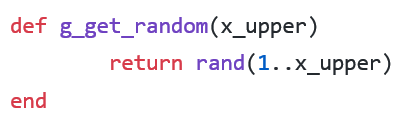
6. Random made simple – Generating random integers was disturbingly simple. I’m just going to leave this method here, as it’s self-explanatory. Didn’t even need to ‘require’ anything to get it to work.

7. String parsing – There must only be a finite number of ways that a string can be assembled that includes several variable strings and constants. I thought I’d found them all until I came to Ruby, which introduced the # and curly bracket { , like so:

Basically, enclosing a variable or method call inside of #{} inserts the value or result accordingly.

8. Looking inside – The search-in-an-array function was also quite elegant. This seemed to be the way with more contemporary languages, as per PHP and Python. To return a Boolean testing for the existence of x_temp_value in array x_temp_magic_numbers:

9. How long is a piece of Array? – after some esoteric results from previous languages’ calls to determine array length, it was (unsurprisingly) fairly elegant to find that Ruby actually gave you what you were after… the actual number of items in an array which had been populated.  Using this as an iteration upper-boundary looks like this:

(and yes, that is an old-school ‘newline’ character being piped to output. Be still my beating heart.)

All that glitters

The verdict? I didn’t mind it. A few weeks later I used my new-found Ruby skills to fix something in Liquid which would have otherwise confused the hexadecimal out of me. It takes some getting used to, but having gotten into a rhythm of code translation and with the online assistance of those-who-have-gone-before, it’s pretty approachable.

NEXT POST… The next challenge came in testing some basic comparisons – which language executed the algorithm the best? The results were… unexpected, and led me down a deep dark warren of data analysis.

Photo by Lum3n from Pexels

Design and Code – Part 8 – Implementing ‘Auto120’ in Python

This is the eighth in a series of blog posts I’ve been working on during COVID isolation. It started with the idea of refreshing my systems design and software engineering skills, and grew in the making of it.

Part 1 describes ‘the problem’. A mathematics game designed to help children understand factors and limits which represents the board game Ludo.

Part 2 takes you through the process I followed to break this problem down to understand the constraints and rules that players follow as a precursor to implementation design.

Part 3 shows how the building blocks for the design of the classes and methods are laid out in preparation for understanding each of the functions and attributes needed to encapsulate the game.

In Part 4 we get down to business… producing the game using the programming language PHP with an object orientated approach.

Part 5 stepped it up a notch and walked through a translation of the code to object orientated C++.

Part 6 delves into the world of translating the code into object-orientated Java.

In Part 7 the same code is then translated into Javascript.

Now in Part 8, after taking a long, deep breath, I slide into the sinuous world of Python.

Get in touch on Twitter at @mr_al if you’d like to chat.


Python

Available on GitHub at: https://github.com/mr-alistair/ootest-python

I took a long run up at Python and was prepared to hate it. OK, hate is a strong word, so hear me out. I’d taken a look at it a few years ago and was underwhelmed. Compared to some of the more mature languages I’d dealt with so far, and the hype surrounding what Python was allegedly capable of doing, I was struggling to understand where it sat in the pecking-order of power and respectability.

That said, I was prepared to set aside prejudice and give it a go. From the outset there were a few things that I struggled with. In no particular order, these were (are):

1. A dearth of brackets – All of the languages I’d used for the Auto120 algorithm so far relied on a variety of parentheses to contain methods, loops and conditionals. In an ironic twist for a language named after a writhing, curling snake, there was none of that to be had. Instead, Python relied on – shudder – spacing.

Do you remember the episode of Silicon Valley where Richard’s girlfriend prefers to use Spaces over Tabs? This sort of thing is a holy war that will never be resolved. Such is Python’s understanding of exactly where you intend to terminate a class, loop, method or conditional. A relaxed attitude towards this led me to other issues, but more on that later.

2. Terminate how? – It is amazing how quickly you get used to ending lines of code in a semi-colon. Not with Python, which considers the end of the line… the end of the line. A new-line character does exactly what it says on the pack – tells the compiler that the current line of code has ended, and that the next line of code is separate. This felt like driving without a seat belt on. You could do it, but it felt at best oddly uncomfortable and at worst dangerously unsafe.

3. Explicit self-reference –  When declaring a Method within a Class, it took me a while to figure out that the Method did not auto-magically pass a copy of ‘itself’ when executing, meaning that they needed to be declared as such:

This seemed a bit avoidant, but after a while I got into a rhythm transcribing and was prepared to let it go. It took some getting used to the fact that calls to the Methods from *outside* the Class did not require the ‘self’ call, which resulted in the awkward practice of having a different number of arguments passed to the call than was defined in the declaration. 

4. Pass the parcel – One part of Python that I became endeared to – in much the same way as you admire the arty/rebel kid who you think is cool mainly because you don’t have to parent them because they belong to someone else – is the ‘pass’ command. Effectively, this does nothing, but it does it with style.

What I like about ‘pass’ is that it fills the space that would otherwise be empty, and in doing so, allows for a degree of comfort and aesthetic in coding that would otherwise be blank space. Confused yet? Don’t be.

Why is this important? For the reasons I mentioned above…Python’s lack of terminating punctuation (in the form of semi-colons or parentheses) means that the non-executed ends of conditionals or other logical branches would otherwise dangle like a grammatical participle. ‘pass’ could thus be used to help the code-reader (or engineer) to show the logical conclusion of a condition, such as:

5. Matryoshka arrays – Declaring and instantiating an array of Classes was a recurring theme for me through my code-porting exercise. Especially, overcoming the different languages’ grammar for how to both create and populate an array element at the same time proved a head-banging exercise that left a neat row of mirror-reversed QWERTY marks on my brow.

Python liked things explained to it in simple terms. As I get more used to this language I’m sure my approaches will improve, but sometimes in coding we all do things to get by and to let us get on to the “next thing”.

In this case, it was how to create the array of Markers (the object p_pieces) in the constructor method of Player. (known in Python as “__init__” as calling it a “constructor” would just make life too easy.)

So, I cheated and did this:

(where x_id is the number of the Player, either 1 or 2).

This simple and inelegant bit of code did what I needed – it created an array object called p_pieces consisting of five Markers which themselves were instantiated by being brought into existence by this call. Done. On to the next thing.

6. Returning what, exactly? – Like php, Python did not expect a Class method to be declared with the type of object that it was returning. This was useful but caused other issues which I tripped over in Ruby, later.

7. Roll the dice, pick a date – With a brow-mopping sense of relief, Python’s random integer number generation is a breeze compared to some of its forebears. Inclusion of the ‘random’ library allows for the following:

…where, funnily enough, you get an integer random returned between the values of 1 and 6, inclusive. Too easy.

Date parsing was slightly more convoluted, but no more than any other languages. Following an import of ‘datetime’, one could do:

Where g_now is a string and holds the date/time stamp, and the strfttime (string/format/time) method converts it to read something like 2019-11-21  14:45:22. (used, as above, to feed a value into the g_log_move method).

8. Finding value in an array – Thank the coding gods that this was easier than other languages. Returning a Boolean by looking for value x_temp_value in an array named x_temp_magic_numbers was as easy as:

9. Loops within Loops – This did my head in. Once the code was complete and would execute, I found whole swathes of methods not being executed or called, leading to infinite runs of looping games that didn’t move beyond a logical point.

I had wondered if I had fallen victim to my usual coding trick – poor punctuation terminating a section of code – but given that Python has a low dependency on such things, it fell to me trawling through the code and insert lots of debug markers to trace exactly where the code was going.

This took a long while to track down, and in doing so identified two different problems.

Problem number 1: The logic that searches for penultimate and factor targets (g_target_magic_numbers) was not executing correctly, resulting it returning values that were leading to ‘blowouts’ of Player Markers. This meant that games were going far longer than normal. Additionally, the method that sought out opposition Player Markers to target was not behaving, often seemingly finding, then ignoring, juicy targets. So, what to do?

Lessons from the French

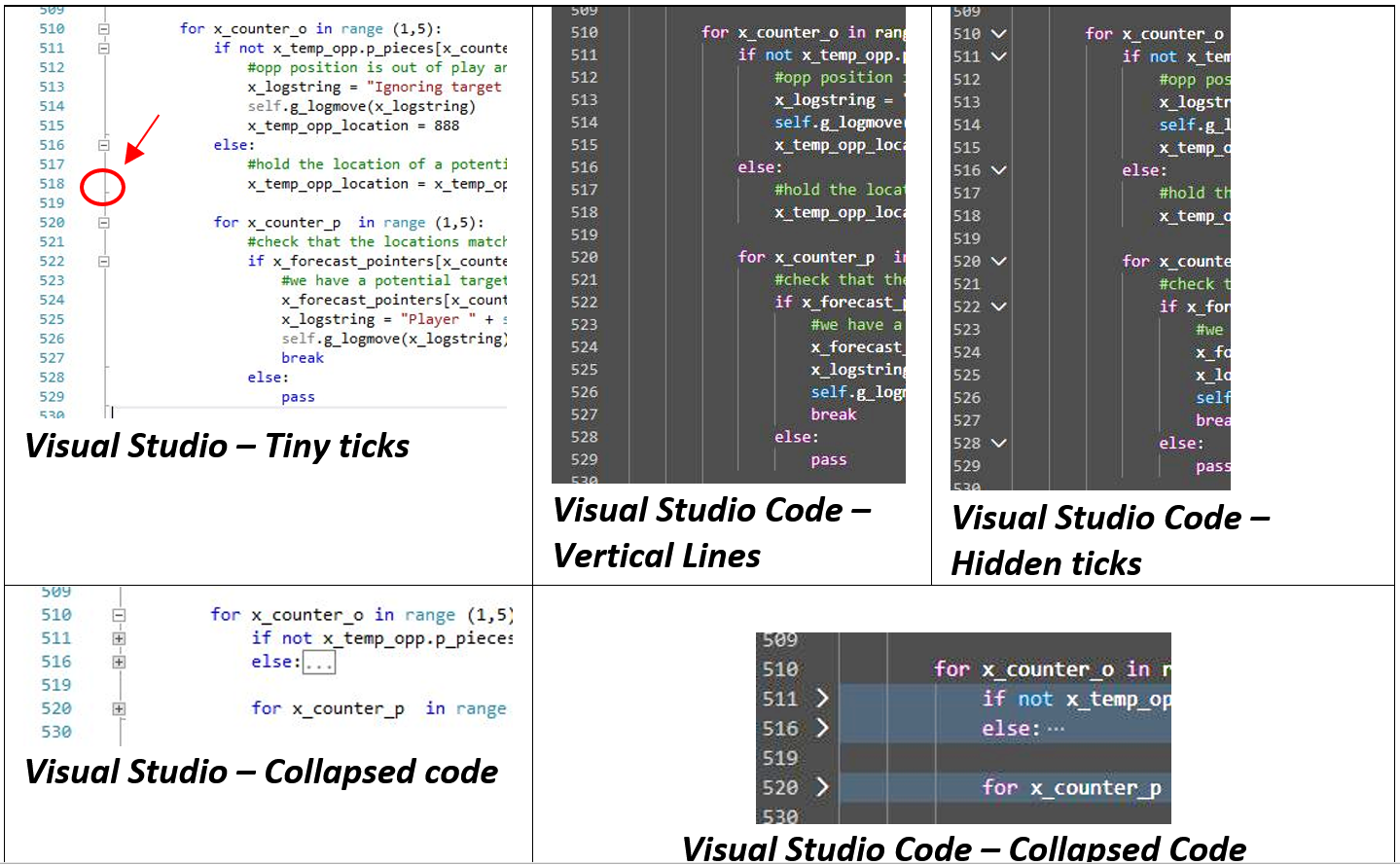
In a typical IDE for parentheses-bounded code, helpful markers will provide a visual indication of the start and end of an iteration, method or conditional. However, with Python being based on spacing, the indications don’t exactly come out and slap you in the face.

Visual Studio has tiny tick-marks to indicate blocks of code. Visual Studio Code has long vertical lines. Visual Studio lets you ‘collapse’ blocks of code using the [-] tool… but for conditionals will only collapses them up to the point of an ‘else’ statement. Visual Studio Code has down-arrows which only appear when you hover over the far-left of the IDE next to the line numbers… and again, it only collapses code to the point of an ‘else’.

Figure 1 – Hidden tick/line things in IDEs. Click to open a larger version.

But you know what the French apparently said in the 13th century – “Mauveés ovriers ne trovera ja bon hostill!” or, more colloquially – “A bad workman will blame his tools”.

Spacing and tabs issues had become my new punctuation issues. All throughout the Games class I had been sloppy with spacing, often with a single character of alignment bringing the difference between a neatly blocked set of code, and a logical behemoth which kept going until it fell through a catch all at the end. The issue was compounded across various paragraphs and methods, forcing me to go through line by line, with comment markers acting as a proxy to help me visualise where things ‘should’ end versus where they ‘were’ ending.

OK – I got that sorted and started to see valid outputs and runs.

Wrapping up on Python

I can see why people like Python, I really do. For me it involved a lot of ‘unlearning’ and keeping an open mind to what a more contemporary approach to languages meant. I also enjoyed the power of what Python allowed me to do, particularly when it came to shelling out to a command line and being able to run multiple instances (in this case, through Windows Powershell) and pipe the results accordingly.

It was also very transportable; with a few tweaks to the calling class I was able to run the same code up on my cPanel/Linux service with ease.

Discipline in coding is a good thing (says he, like a mantra) and we all know the pain of picking up someone else’s code and spending hours figuring out ‘what on earth have they done, here…?’. That said, in my experience one of the best ways of learning about any sort of technology is picking something up that is ‘broken’ and figuring out how it works. I mean – hey – it was already broken, what’s the worst you can do. Right?

NEXT POST… It’s a darling of song titles, a cardinal gem and the name of our family dog. In the next post I take a multi-faceted approach to Ruby. (See what I did there? hashtag dadjoke)

Photo by Lum3n from Pexels

Design and Code – Part 7 – Implementing ‘Auto120’ in Javascript

This is the seventh in a series of blog posts I’ve been working on during COVID isolation. It started with the idea of refreshing my systems design and software engineering skills, and grew in the making of it.

Part 1 describes ‘the problem’. A mathematics game designed to help children understand factors and limits which represents the board game Ludo.

Part 2 takes you through the process I followed to break this problem down to understand the constraints and rules that players follow as a precursor to implementation design.

Part 3 shows how the building blocks for the design of the classes and methods are laid out in preparation for understanding each of the functions and attributes needed to encapsulate the game.

In Part 4 we get down to business… producing the game using the programming language PHP with an object orientated approach.

Part 5 stepped it up a notch and walked through a translation of the code to object orientated C++.

Part 6 delves into the world of translating the code into object-orientated Java.

In Part 7 the same code is then translated into Javascript. Read on!

Get in touch on Twitter at @mr_al if you’d like to chat.


Javascript

Available on GitHub at: https://github.com/mr-alistair/ootest-js

So – Java to Javascript – that would be simple, right? It was. By this stage I’d gotten into a rhythm of finding the things that I was going to trip over when changing from language to language and knew to start by experimenting and targeting the areas I’d figured were dramatically different.

Javascript is not Java. If anything, Javascript looks like C++ and PHP had a kid and raised it in a land where they speak HTML. Calling it a ‘script’ is doing it a disservice, though. It can certainly do a lot of the heavy lifting at the ‘front end’ of a web-based system and let PHP and other code handle the ‘back end’. (I haven’t gone into the front end wonders of jsquery or server-side entertainments like node.js here. Maybe one day soonish.) And with modern browsers you have built-in debugging to boot, so that was a bonus.

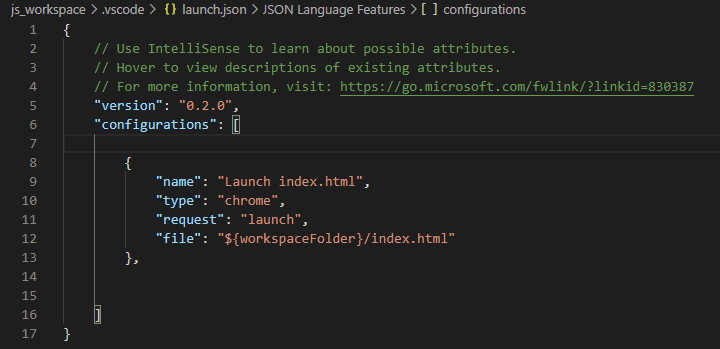
It was time to consider a different IDE, which had also emerged as a theme of what I was exploring. I went with Visual Studio Code, the street-wise younger sibling of Visual Studio. There were some set-up things which were interesting. Visual Studio Code has a set of plug-in Extensions which provide additional syntax and debugging support, and some run-time libraries for languages that need it. My client browser would execute the Javascript, so VSC needed to know this:

Figure 1 – Workspace configuration in Visual Studio Code… dark mode… such edgy, much black. Wow. Additionally… telling tool where to launch test code from (via Chrome, calling index.html in the workspace folder).

There was also a great Debugger for Chrome (by Microsoft) which helped when stepping through issues within the IDE. All set.

Object Orientated in Javascript

Object Orientated mechanisms in Javascript, for web-based solutions, meant that instead of the standard ‘wrapper’ Class that I’d built to trigger proceedings in other languages (usually a Class named Auto120), I had a HTML file instead. This had two <script> blocks – one to hold the src calls to the three Class modules, and one to execute the game.

Some key differences from the start included:

All variables need to be declared up front as a var , or cannot be referenced without Javascript thinking that it was a procedure call. Like PHP, these variables were loosely typed. The pedant in me usually declared and assigned them a value, such as 0 or “” to remind myself what they were supposed to be.

Where Java required an instance of a Class to be declared by the Class name [i.e. Game thisGame = new Game();  ,  Javascript needed this to be declared as if it were a variable, i.e.  var thisGame = new Game();

In the C++ and Java versions I was used to piping output to the standard terminal output channel; in Javascript it was back to rendering it as HTML. So, it was <br> instead of \n . At least string concatenation was easier, using “+” in the same way as “.” is used in PHP. Standard Javascript ‘document.write’ was used for writing browser output.

Class procedure definitions took me back a step, however, as Javascript reverted to the “this” precursor to identify the ownership of each property or method.

Defining arrays introduced me to the ‘push’ call, which I thought I had put behind me with an ill-fated foray into Assembly language as a teenager. Populating an array of Player Markers became an iteration around:

 this.p_pieces.push(new Marker(x_counter));

…where x_counter sequenced from 0 to 4. Yep, we only wanted to deal with Markers 1 to 4, but I cheated and filled in the first array position, 0, as well.

Totally random

A new language to explore meant a new way of figuring out how to generate a random number. For Javascript this ended up being a nesting of two of the implicit Math-class methods – random, and floor.

Math.random will return a floating point value. Multiplying this by the given upper-boundary integer will produce… a larger floating point value. This is great if you want an answer of 4.323 or 2.534 … but I wanted a nice, clean integer between 1 and 6 inclusive. Enter Math.floor which returns the largest integer less than or equal to the current number. Great! As it’s the lower boundary, however, we need to add one to it to bring the lowest possible value up from 0 to 1. So, we end up with:

Presto. One random number between 1 and ‘g_upper’ inclusive.

Back to arrays

Arrays had me pulling my admittedly sparse hair out a few times, particularly where null values or out of bounds results were causing fatal errors. This is where old-school stepping through code during debugs and setting ‘watch’ on variables can be a life saver. I was used to iterating through an array and referencing positions 1 through to 4; most of the arrays I was dealing with expected a value at position 0 as well, otherwise making a reference to the array ‘as a whole’ would trip the wire.

A simple/inelegant fix was to ‘push’ a dummy value to position 0 on the array prior to getting down to business. This value was to be ignored anyway, and for the sake of a few bytes of memory, I was happy.

Two dimensional arrays were just as fun. The breakthrough came when I realised that a two-dimensional array was effectively one array with another array ‘pushed’ into it several times. (My mind keeps thinking of that American culinary delicacy, the Turducken, but we shall not speak of this, here.) So:

…gives us the two dimensional array x_forecast_pointers which, at position 0, has an instance of array x_forecast_internal. A later loop (not shown here) then pushes additional instances into x_forecast_pointer by setting the values within of x_forecast_internal and pushing them into the next available position. I was legitimately surprised that this worked.

When it came to searching for values within an array, I fell back to iterating through the array sequentially. There is an array find() function but, when considering code portability, it is not supported in IE11. Mind you, I’m not particularly supportive of IE11 either, so we’ll call that one a draw.

Making a true independent copy of an array was far easier using the array slice() method, vis:

Walking the talk

So, they were the big-ticket items. Testing the code proved interesting, as with most browser-based renderings one typically must wait for the code to complete before it starts ‘writing’ anything to the document… in this case, the HTML page. It was fortunate that the Visual Studio Code IDE has a built-in console interface that you could output to which helped when it came to stepping through things.

The issue with this is that sometimes code got stuck in a loop (my usual problem of poor punctuation, generally due to missing a bracket on an iterator) and so it appeared to ‘freeze’ after it had flushed output to the first page of so of HTML. Tracing these, particularly with nested conditionals and repeated call-backs is a tedious exercise – it teaches one a wax-on, wax-off lesson about cautious coding, and alcohol consumption while doing so.

The verdict?  I didn’t mind JavaScript at all. I gained an improved appreciation of where it ‘sat’ in the big scheme of full-stack development for web-based apps. Down the track I’ll take a closer look at node.js and jsquery, but for now I had another serpent to wrestle with…

NEXT POST… Python! Would this slippery beast prove my undoing? Find out next time…

Photo by Lum3n from Pexels

Design and Code – Part 6 – Implementing ‘Auto120’ in Java

This is the sixth in a series of blog posts I’ve been working on during COVID isolation. It started with the idea of refreshing my systems design and software engineering skills, and grew in the making of it.

Part 1 describes ‘the problem’. A mathematics game designed to help children understand factors and limits which represents the board game Ludo.

Part 2 takes you through the process I followed to break this problem down to understand the constraints and rules that players follow as a precursor to implementation design.

Part 3 shows how the building blocks for the design of the classes and methods are laid out in preparation for understanding each of the functions and attributes needed to encapsulate the game.

In Part 4 we get down to business… producing the game using the programming language PHP with an object orientated approach.

Part 5 stepped it up a notch and walked through a translation of the code to object orientated C++.

Now in Part 6 I do the same thing, but in the world of Java.

Get in touch on Twitter at @mr_al if you’d like to chat.


Java

Available on GitHub at: https://github.com/mr-alistair/ootest-java

I’ve never officially been ‘taught’ Java. I missed out on that from a University perspective by a few years and was only ever exposed to the compiled after-math in the ‘90s and ‘00s.

Overcoming prejudice

My feelings about Java have been mixed. Early exposure in the corporate world was to chunky Windows-GUI analogues that didn’t look as polished a their C++ or VB peers, leaky unix-based apps that required regular garbage-dumps that would freeze activity system-wide while they took out their memory-trash, and intimidating thread dumps that provided wholly unsatisfying evidence as to what had actually gone wrong, and why.

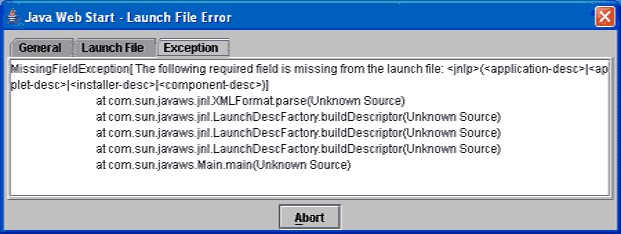
Figure 1 – A bit of nostalgia; likely to have been be the first exposure to the joys of Java for many of us. What does this even mean? It’s a mystery wrapped in an enigma.

In terms of technical prejudice, my inner sceptic had become wary of any solution that positions itself as being pan-platform, write-once-run-anywhere, saviour of all developers, etc. The hype of so-called ‘5th General Languages’ (5GLs) in the ‘80s had also made me wary. The reality of having to specifically match a range of different Java Runtime libraries based on the vendor, platform and operating system simply meant that did not live up to the hype. (I was particularly scarred by trying to get an enterprise integration platform up and running in a Production environment, and the darn thing just would…not…start. Turned out there was a minor (I’m talking x.x.00n) version difference in the Java runtime libraries between the non-prod and prod environments, and that was all it took.)

Oh, and the typeface on any GUI implementation always left me cold… felt like I was back in the 16-bit graphics days. Nostalgia will only get you so far.

Forearmed

Armed with my knowledge of what was different between PHP and C++, I had a better idea of what I would face in converting the algorithm to Java. My first move, however, was to look for an appropriate IDE. I tried in vain to find suitable project plugins for Visual Studio which matched the toolkit I’d used when coding in C++. Having previously attempted to code Android Java in Eclipse, I downloaded that instead and got to work.

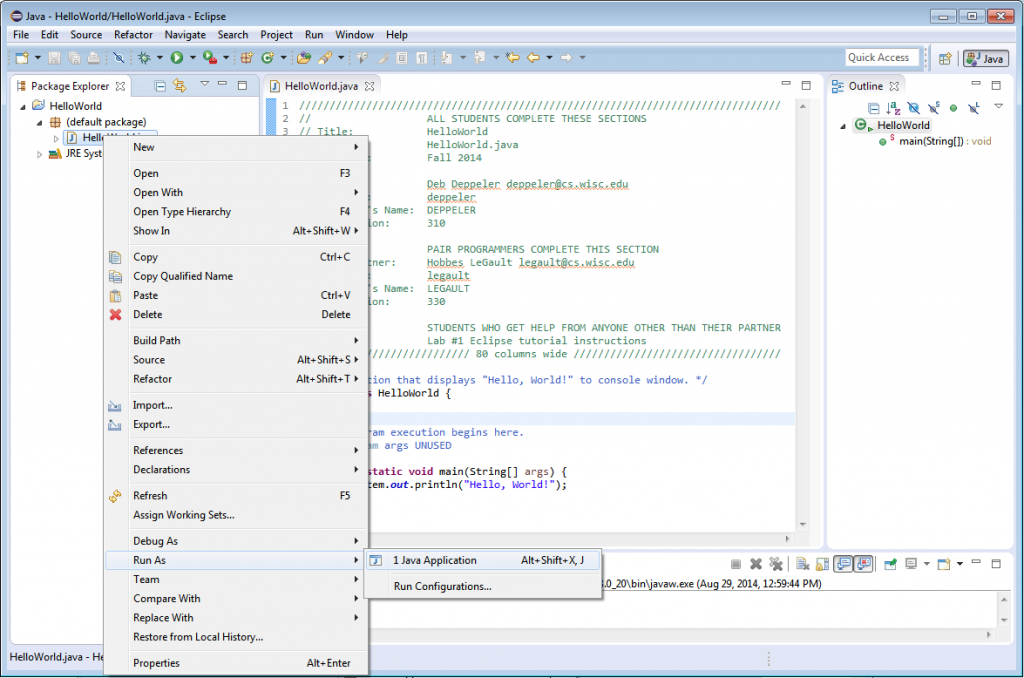
Figure 2 – Example of the Eclipse for Java IDE, stolen from the website of the Computer Sciences faculty of the University of Wisconsin-Madison

Translation from C++ to Java

The transcription was far easier than I though it would be. The syntax and grammar of the languages was a lot closer than anticipated, save for the nuances between how things are defined. It’s a bit like the difference between German-German, and Swiss-German. Close, but with klein aber fein differences.

Class definitions and internal references to properties did not require the use of ‘this’. Clearly it was self-evident to Java that ‘this is mine’ was the default and did not need to be explicitly mentioned.

As for Booleans, False was false and True was true. Easy.

Classy Arrays

Instantiating an array of another Class took me a few goes as I was over-complicating it. Java allowed the simple call of:

       Marker[] p_pieces = new Marker[5];

…to tell the compiler ‘this property will be a 5-element array of class type Marker’. As a BASIC programmer from way back, it took me a little while to get used to having to define a property as a type of the Class you were about to tell it that it was, anyway. It was not helped by online articles and help-support topics that showed it like so:

               Classname classname = new Classname;

(or, more frustratingly:                 Foo foo = new Foo; )

This always tripped me up… especially when the writer would give the property/variable name the same name as the Class. Took me a lot of trial and error (and stackoverflow trawling) to realise that there were a few things going on here. Simply declare the property, and you end up with a null property. Declare AND instantiate it at the same time, and you get a property that is enlivened with whatever the Constructor method for that Class provides.

Two dimensional arrays followed a similar path. In the Game class method g_target_magic_numbers there was a need to instantiate a two-dimensional array of integers. After some mucking about this ended up being simple:

       int[][] x_forecast_pointers = new int[5][3];

What I realised earlier, though, was that the element values in this array needed to be set BEFORE they could be referenced, or a null pointer error was returned. So, for one-dimensional arrays where a value may or may not be filled, it was a case of saying up front:

int[] x_piece_array_pointer = {0,0,0,0,0};

Making a hash of it

Searching for the existence of a value in an array gave me the chance to try out a different method – hashing – which research had informed me was a more efficient over iterating across the entire array.

Establishing a hash set from an array of values involved including the following class libraries, and making the following calls:

import java.util.Arrays;

import java.util.HashSet;

    final Set<Integer> x_temp_magic_numbers = new HashSet<Integer>();

x_temp_magic_numbers.addAll( Arrays.asList( 20,24,30,40,60));

So now we have a hash set named x_temp_magic_numbers that contains the five values.

Returning a Boolean when searching for a value within this hash set occurs through:

x_test_1 = x_temp_magic_numbers.contains(x_player.p_pieces[x_temp_value].m_get_location());

[vis, return a true/false IF the location of x_player’s piece number x_temp_value (which is identified through the method m_get_location) exists in the hash set held by x_temp_magic_numbers]

At this point, I was pining for PHP’s “in_array” method.

Do what I say, not what I intend

Copying arrays was also straightforward…but came with another hitch. Initially, I did the following:

System.arraycopy(x_piece_array_pointer, 0, x_piece_array_backup, 0, 5);

I’d tried to be economical (read: lazy) and ignore array position zero as I was only interested in the values in positions 1 through to 4 – the array of Markers for each Player. I even left myself a prompter note in the comments:

//hopefully won’t fail as index 0 is not set

A few hours later, this comment read:

//hopefully won’t fail as index 0 is not set  //well…it did…

..because of exactly what I had predicted. In a Java array, even if you have happily populated 4 out of the 5 elements… if one element is null, then a method such as arraycopy will crack it. Also, the final integer passed to arraycopy is the total length of the array, not a pointer to the final index (which would typically be 4).

What arraycopy did do (when I corrected my issues of having null elements) was to create a true new instance of the array, rather than a pointer to the original one. This took me a while to work through, as if I’d simply said “this array [equals] that array” it would assume that I wanted a logical reference, not a fresh and independent copy.

Random variations

Getting an integer random number was fun. I used the java.util.Random library and generated it like so:

             Random r = new Random();

return r.nextInt(g_upper) + 1;


The second line takes some explaining. Random() by itself sets a seed and initiates the random number generator. nextInt(value) generates an integer between 0 and the provided value (in this case identified by the variable ‘g_upper’)…minus 1. So, if you want a random number like a die roll, you need to get the method to add one to the value generated.

Java coded packages tied up with strings

Couple of final things in the Java world: strings and concatenation were easier to handle following my traumas with C++. The difference being the need to explicitly call the ‘toString’ method before the Integer class of the object, even though the variable object was an Integer. For example, in the logging method:

g_logmove(“Player ” + Integer.toString(g_playerturn) + ” will go first.“);

Formatting date/time in the logging method took a bit of tweaking as well. Rather than trying to squeeze it all into one line, I broke it up for readability.

Integer x_movecounter = this.g_movecounter;       

DateTimeFormatter dtf = DateTimeFormatter.ofPattern(“yyyy-MMM-dd HH:mm:ss“); 

LocalDateTime now = LocalDateTime.now(); 

String x_timestamp = dtf.format(now); 

g_movelog[x_movecounter] = (x_timestamp + ” — ” + x_logmove);

Wrap up

Some interesting observations – Java did not suffer the same random-seed issue that I had experienced in C++. I was able to punch out to a command line and execute it from my workspace using:

       java -classpath Auto120 Auto120.auto120

…which enabled me to capture some interesting stats on repeated runs which I’ll discuss in a later post.

And, indeed, I was able to pick up and run the code on an Ubuntu Linux installation with no modifications. Heh – turns out what is written on the side of the pack is true. Go figure.

Java was a bit of fun, and by now I was seeing a regular pattern in the things that differed (or aligned) between the languages. Therefore, translating from Java to Javascript should be pretty straight forward, right? Right…? Hello..? (taps microphone)

NEXT POST… Javascript. It’s not quite Java, and it’s not a pure scripting language. So what gives?